🧩 HTML Script Integration
The Creative Connect script (creative-connect-web) is the easiest way to embed Collective Audience creatives into your adserver or page.
It automatically injects our creative container and handles tracking, click macros, and delivery.
⚙️ How to Use#
1. Copy your script from the Desk#
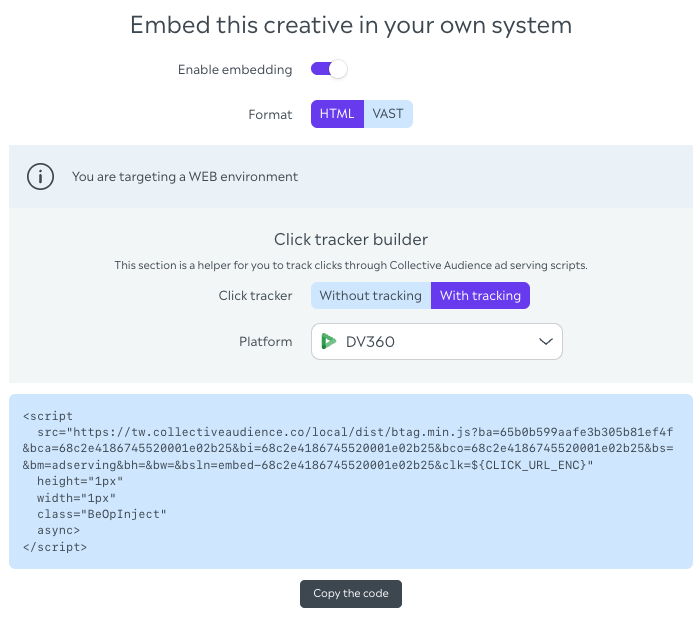
From your creative’s “Embed” tab, select:
- Format: HTML
- Click Tracker: with or without tracking
- Platform: your adserver (DV360, Adform, Xandr, etc.)
You’ll see a ready-to-use tag:
<script
src="https://tw.collectiveaudience.co/local/dist/creative-connect-web.min.js?ba=YOUR_ACCOUNT_ID&bca=684a8d16c441f229093f2fef&bi=684a8d16c441f229093f2fef&bco=684a8d16c441f229093f2fef&bm=adserving&bsln=embed-684a8d16c441f229093f2fef&clk=${CLICK_URL_ENC}"
class="CreativeConnect"
async
></script>
2. Configure optional parameters#
| Key | Description | Example |
|---|---|---|
BS | CSS selector where the div is injected | .ad-slot-1 |
BSLN | Slot name | embed-creative123 |
BW / BH | Max width / height | 300 / 250 |
BM | Mode (adserving, hardlink) | adserving |
DSPM | Display mode (interstitial, expand) | expand |
INTD | Interstitial delay (ms) | 3000 |
info
We recommend using 1×1 creative sizes for maximum flexibility and layout adaptation.
Legacy URLs
The paths /local/dist/btag.min.js and /local/dist/btag-dev.min.js remain available as aliases of creative-connect-web.min.js for existing adserver tags. Prefer creative-connect-web.min.js for new integrations.
3. Platform-specific tips#
DV360 / Google Ad Manager#
- Use the Third-party tag integration (not HTML5).
- Disable SafeFrame to ensure full creative interactivity.
Adform / Xandr / Equativ#
- Paste the full script directly as a 3rd party tag.
- Ensure creative dimensions match the configured slot.
warning
HTML5 integrations are not supported with our script tag. Always use the 3rd party tag option.
✅ Validation#
Once implemented:
- Check the creative renders properly on page load.
- Click tracking fires through your DSP tracking system.
- Verify via browser console:
CreativeConnect loadedshould appear.