Conversion Tracking – Postback & Pixel Integration Guide
Overview#
Collective Audience provides a Click ID–based conversion tracking system designed to be reliable, privacy-friendly, and compatible with both client-side and server-side environments.
This system allows advertisers and publishers to track conversions using:
- a simple image pixel,
- JavaScript,
- or a fully Server-to-Server (S2S) postback.
As long as the Click ID is correctly captured and returned, the conversion will be accurately attributed.
Step 1 – Click ID Injection (Audience Desk)#
When configuring a campaign in Audience Desk, Collective Audience automatically generates a unique Click ID for each click.
URL Macro#
You can inject this Click ID into the advertiser’s final URL using the macro:
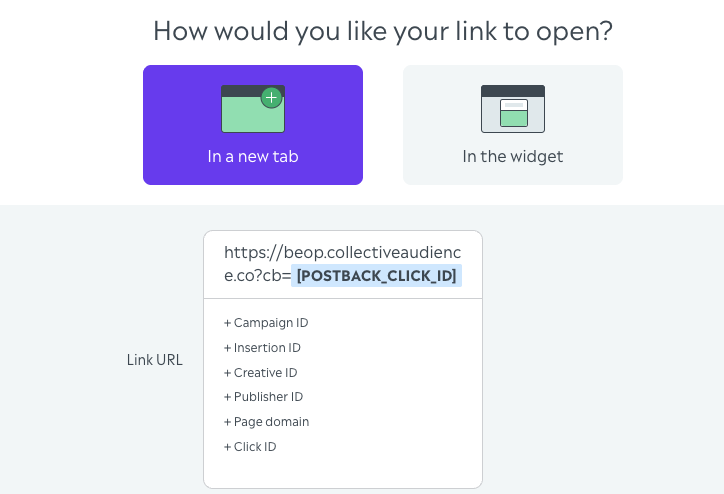
Example Final URL#
💡 Important: The advertiser is free to name the parameter however they want:
click_idsub_idcidtransaction_id- or any custom name
Collective Audience will always populate it with the correct unique Click ID at click time.
Step 2 – Capture the Click ID on the Advertiser Side#
When the user lands on the advertiser’s site, the Click ID is already present in the URL.
JavaScript Example#
Store this value until the conversion happens:
- cookie
- localStorage
- session
- backend database
Step 3 – Send the Conversion Event#
Once the conversion occurs, send the Click ID back to Collective Audience.
Option 1: Image Pixel (Simple & Universal)#
✅ Easy to implement ⚠️ Subject to browser limitations
Option 2: JavaScript Call (Client-Side)#
Useful for SPA or client-side flows.
Option 3: Server-to-Server Postback (Recommended)#
This is the most reliable method.
cURL Example#
Node.js Example#
✅ Not impacted by ad blockers ✅ Not dependent on browser consent ✅ Strongly recommended for performance and accuracy
What Happens on Our Side#
When the conversion endpoint is called:
- The Click ID is validated
- The full delivery context is retrieved (campaign, creative, inventory, format)
- The conversion is recorded and attributed
- Data becomes available in reporting & analytics
No additional parameters are required.
Best Practices#
- Always pass the same Click ID received on landing
- Prefer Server-to-Server postbacks
- Trigger one call per conversion
- Test with real traffic before scaling
Privacy & Compliance#
- No third-party cookies required
- Click ID does not contain personal data
- Fully compatible with consent-based environments (GDPR, etc.)
Summary#
✔ You inject [POSTBACK_CLICK_ID] in the final URL
✔ The advertiser captures it on landing
✔ They send it back on conversion
✔ Collective Audience reconciles everything automatically
Simple, flexible, and reliable.
Need Help?#
Contact your Collective Audience representative or support team if you need help validating your setup.